6 Favorite Teamwork Management Applications in 2021

One important key of human resources management is the ability to develop high rates of employee satisfaction and how to manage teamwork effectively. Human resource management optimization is a top priority for startups and the level of productivity depends mainly on resources are managed in your company.
As the result, founders and startup team members need to learn to choose the right tools to increase efficiency and freedom to work and perform according to goals.
Using online project management software has been proven beneficial for many businesses including large and small-scale businesses when your companies work remotely in association with people from different locations, and get struggles in communication. Teamwork management applications have made tasks easier to complete and project collaboration more convenient.
Among thousands of modern and affordable tools available, finding the right tools can be time-consuming and overwhelming. Here are 6 favorite teamwork management applications in 2021 that help you boost team productivity.
1. Teamwork
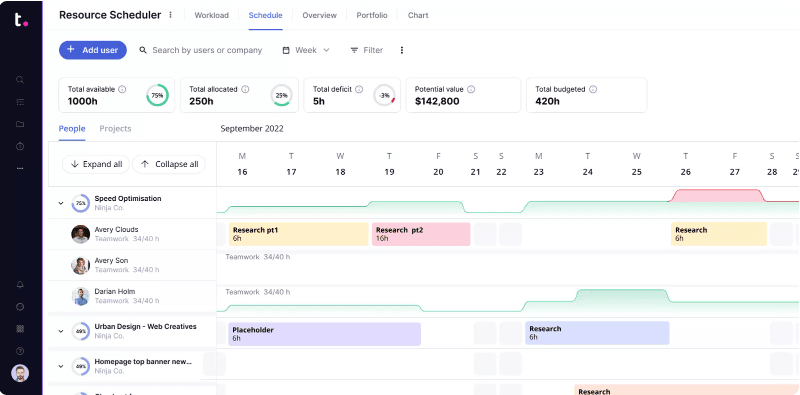
Teamwork is a cloud-based project management solution that provides businesses functionalities to manage different operations of a project and help teams to manage their priorities, track progress, and hit deadlines.
Team members can make project management quicker and more efficient thanks to Teamwork’s multiple advanced features include Gantt charts, board view, Portfolio management, time tracking, reporting dashboards, workload management, task lists, file uploads, and messages that help time-saving. Teamwork also enables integrations with tools such as Slack, Drive, Hubspot, Dropbox.
The app helps you get organized and ensure projects are delivered on time and on budget. Teamwork application is trusted by 20,000 businesses such as Paypal, Spotify, Netflix, Panasonic.
1.1 Features
- Creating tasks and projects, uploading files, and adding comments.
- Calendars help to track your meetings, holidays, and major deadlines.
- Offer status updates get real-time on project progress from your team through Kanban boards.
- Milestones mark your highest priorities and important deadlines to make sure you hit those goals.
- Contacts keep your team members, collaborators, and clients in the loop where everyone can communicate without losing connection.
- The project time tracker tool optimizes better your time management.
- Dashboards, Board View, and project health status updates to see how your project is progressing and what’s left to do.
- Allow users to share documents within the team through an online portal.
- The client billing feature allows users to generate invoices based on hours worked and expenses incurred.
- Workload gives you a quick overview of everyone's capacity, maximizes team resources, so you can manage resources more effectively, quickly reassign tasks.
- Project Management Templates can help all types of teams save time, improve processes with clear timelines.
1.2 Cost
- Starting price: $10.00 per month.
- Available 30-day free trial.
- Free version- For individuals and small teams getting started with project management, for 2 projects and up to 5 users.
- Deliver version – To manage multiple projects for €10/month.
- Grow version – For larger teams with features to help get you efficient and organized for €18/month.
- Enterprise – Advanced security, extra speed, and additional security, contact Teamwork directly.
2. Todoist

Todoist is a cloud-based service and a productivity app that helps teams and individuals organize work and life, so all your tasks and notes sync automatically to any device where you use the app.
Todoist provides a combination of features that ensures people always work on the right things at the right time without missing anything that helps to reach the goals.
There are some advantages of Todoist:
- Cross-platform support with effortless, reliable syncing.
- Efficient user interface.
- Excellent natural language input and productivity reports.
- Collaboration features.
- Works offline.
Todoist provides different functionalities like adding and scheduling tasks, syncing your inbox and adding due dates to the calendar, organizing projects, assigning tasks to each person, and collaborating.
Users can set priority levels for each task and project, achieving better time optimization. The platform offers a list of integrations with tools such as Slack, Gmail, Outlook, and more. Todoist has apps for every major platform: Android, iPhone, iPad, macOS, Windows, Android Wear, Apple Watch, browser extensions, and the web.
2.1 Features
- Todoist offers tasks categorization with labels.
- Sorting all tasks due today by who is responsible for them, priority rating, or grouped by the person assigned to do them.
- Productivity time tracker and workflow of the team members.
- Voice commands instead of texting and typing work content.
- Personalized lists and boards, build your own task views to fit your unique style and workflow.
- See tangible progress through adding up to big achievements over time, setting daily and weekly goals, and visualizing your productivity trends.
- Email notifications, push notifications, alerts by SMS, and location-based reminders (Premium only) tasks due date.
- Todoist's template gallery allows you to set up projects which contain templates for projects across a variety of topics, from personal projects, such as moving to a new house, to work-related tasks, like a hiring pipeline.
- Assign tasks to collaborator, upload a file, and add comments, websites, emails, and files to any task to share information with your collaborators, and customize the alerts you receive.
- Todoist keeps automatic backups of your data by downloading a list of backups clearly labeled with time and date stamps.
2.2 Cost
- Price Per Month: From $4 per person.
- Free Version Available.
- Free Account Offered - Includes 5 active projects, 5 collaborators per project, 3 filters, and 1 week of activity history.
- Pro – offers 300 active projects, 25 collaborators per project, 150 filters, unlimited activity history and reminders, automatic backups, and themes for only €3/month.
- Business – offers everything in Pro plus 500 active projects per member, 50 people per project, team inbox, billing, administrator and member roles, and priority in assistance and support. The price is €5/user.
3. ProofHub

It is a simple, straightforward, and reliable saas-based project management software that helps teams organize and track the status of projects, and collaborate in every work culture. It helps to solve the four major challenges that every team faces in their projects are Planning, Collaboration, Organization, and Delivering on time.
Some pros of ProofHub:
- Setup is quick and easy.
- Price is competitive.
- Nice balance of features and simplicity.
- Good tools for discussing visual materials.
ProofHub offers a variety of stand-out features such as task management tools, milestones, Gantt charts, time tracking, reports, notifications, a calendar, in-app chat, discussions, Notes, Online Proofing, Timers, and more.
ProofHub includes an API feature and supports integration with Google Docs and Dropbox which can also deliver content over HTTPS using custom domain names and certificates. ProofHub is supported on iOS and Android devices.
3.1 Features
- Creating task lists, add tasks, add labels, set start and end dates, time estimates.
- Creating projects, categorizing projects by type, client, or the team working on them, and assigning team members to the project, and choose someone to be the project manager.
- Customizing your project by choosing tabs option: Discussions, Tasks, Gantt, Calendar, Notes, Files, and Time.
- Offer the ability to reorder tasks by dragging and dropping them and creating dependencies between tasks in a Gantt chart which provides a visual project timeline helping you to schedule tasks and plan projects efficiently.
- Communication features include both group and one-on-one chat features, as well as a proofing tool that allows users to comment on documents and designs shared within the platform.
- Graphics reports help to generate custom reports and keep track of their resource utilization and project progress.
3.2 Cost
- Free Version Available.
- Starts at $45/month, get a 14-day free trial of the paid plans.
- Price Per Person Per Month: $99 (Unlimited Users).
- Storage Included at Price Listed: 100GB.
4. Hive

Hive is a productivity platform for centralized workflow management, providing solutions for project management, proofing, and approvals, reporting, and analytics for companies of all types and sizes.
Hive with AI and machine learning to provide insights on team productivity and to optimize processes like resource allocation and client billing. It can be integrated with over 1,000 SaaS tools including Asana, Trello, and Basecamp, from which it can import tasks.
Some pros of Hive:
- The user interface is very intuitive with multiple project visualization options like Gantt, Kanban, calendars.
- It is versatile to convert a project to a calendar view from Kanban-style.
- Good design and robust customer support.
- Easy to use.
4.1 Features
- Creating tasks, assign them to their members, chat, share files, and automate task management easily and flexibly.
- Hive centralized communication tool where users can communicate through its native chat and email integration such as Slack, Skype.
- Users can keep team members in the loop in terms of their projects and receive alerts about processes, milestones, and updates for upcoming projects.
- With various project layouts, users can organize tasks and projects and choose the Gantt chart, calendar, table, and Kanban board and easily switch between them.
- Assign tasks and provide attributes to each of these such as files, date, assignee, and budget for complex projects.
- Offers dashboards that show actionable insights regarding the productivity of a team to monitor work.
- Integrated email inbox and internal communication.
4.2 Cost
- Free trial of Hive for 14 days.
- Base price is $12/month – Includes flexible project layouts, summary views, chat, Hive mail, meeting notes, automated workflows, and dashboards.
- Add ons – proofing and approvals, resourcing, timesheets, external users, enterprise security, and analytics.
5. Basecamp

Basecamp is one of the most popular projects management and team communication software. It helps to track project and task progress, store and share relevant documents, communicate with your project team, and facilitate project collaboration with them. It offers advanced features includes project templates, Gantt charts, time tracking, priority setting, and more. Thus, it’s used by many large businesses, small enterprises, and freelancers to manage projects and people as an alternative to Teamwork.
Some pros of Basecamp:
- Easy to learn and use.
- Ability to create client-specific projects.
- Built-in communication features.
- Great customer support and price is affordable.
- Integrations and Cross-Device.
- Data Backup.
5.1 Features
- Create tasks or sub-tasks, set deadlines, and then assign them to team members, set notifications, like reminders for due dates, to follow up on these tasks.
- Provide messaging and real-time chat which is Basecamp’s real-time group chat (Campfires), and private conversations (Pings) in Basecamp.
- Tracking progress and deadlines allows users to be updated on the task lists that have been added to the system and real-time updates are provided to remind them of tasks that are due.
- Basecamp reports what’s overdue, what’s due soon, what has someone been up to, what’s new, to-do, and what’s to-done.
- Hill Charts to help track project progress visualize progress over time with snapshots, annotate project updates with comments, review updates over a period.
5.2 Cost
- Pricing model: Free, Subscription.
- Free Basecamp Personal - for personal projects, students, freelancers, families.
- Available free Trial.
- For non-profits and charities, a 10% discount is offered.
- Basecamp Business costs a fixed fee of $99/month or $999/year - included unlimited users, unlimited projects, and 500GB of storage space.
6. ClickUp

ClickUp is a cloud-based work platform for all types and sizes of teams and businesses to manage multiple people and projects.
ClickUp provides all the tools and features to assign tasks to team members, share documents to establish clear processes, create reminders, view how tasks are progressing wherever they are, manage projects for clients and collaborate with colleagues on documents.
Choose list view for to-dos, board view for workflows, box view for dashboards, or Gantt view for project schedules to look at work items and data in multiple views for better understanding and faster tracking.
Some pros of ClickUp:
- It has an excellent interface, intuitive, and easy to use.
- Great customer support.
- No deployment errors.
6.1 Features
- Manage processes and workflows by using multiple views such as a calendar view to check timelines, and Gantt view to track progress.
- ClickUp is customizable and used for bug tracking, sprint management, or product launches. Users can create Scrum dashboards and view progress with different agile charts. Developers can collaborate on code, automate a sprint point system, highlight syntax, and integrate natively with Git.
- Organize tasks, track changes, manage the team and customize what, when, and where you receive notifications.
- Create schedules, organize calendars, manage capacity and resources, plan time, visualize dependencies, add time estimates for automatic scheduling.
- Directly communicate, customizable reports, and share information securely.
- Automatic time tracking with tons of integrations with GitHub, Harvest, Slack,...
6.2 Cost
- Free trial.
- Business: $9 per user per month.