Simple Guide to Use Asana for Managing a Software Development Project

1. Asana -The optimal project management tool
In recent years, applications that support project management have become diverse and popular with many preeminent features. Along with Monday.com, Jira, Trello, Asana is also an interesting and useful tool that helps users with teamwork without using email. Currently, many large companies and corporations have used Asana as a support tool for projects, typically Airbnb and Foursquare.
2. Introducing outstanding features
Developed by Facebook co-founder Dustin Moskovitz and engineer Justin Rosenstein with the original purpose of employee promotion progress at Facebook, Asana is known as a SAAS (Software-as-a-Service) with the outstanding feature which is simplicity. Asana’s scientific and professional design helps users not spend too much time getting used to using this unique application. This project management software is suitable for different projects management methodologies such as Agile projects which have flexibility in management.
 Source: https://asana.com/product
- Asana brings users all the basic, effective and smartest tools in management and a professional working environment through separate workspaces for each project team including:
- a full project name
- completion deadline
- work priority order
- In addition, Asana also allows users to track work progress on tablets, smartphones, or personal computers, add comments, attachments, notes, messages, etc in a very flexible way. Not only does this help to update and control fast work effectiveness, but it also enhances the interaction between project team members.
- Another outstanding advantage of Asana is it is completely free for groups of under 15 members, unlike other tools. Asana with these outstanding features is now becoming a popular project management tool and trusted by users.
- Easily create tasks for yourself or assign tasks to team members.
- Manage tasks by the table, task control, or general list.
- Customize Asana to suit your workflow management.
- Add new workflows to Asana quickly and easily with built-in templates.
- Asana’s flexibility allows it to work for many different applications and approaches, including the Kanban method. By using an online tool like Asana, you get all the benefits of using virtual teams and having a tool do much of the communication for you, but you can also benefit from the framework that something like Kanban provides.
- In Asana, Kanban boards are a great way to execute scrum methodology and manage projects. Creating a Kanban board online, improve project management and move through phases or with visuals, like sprint plans, content calendars, or account tracking
3. Download Instructions
Download this great project management tool can be done easily on popular sites such as Google Play, Apple AppStore, etc.
Only with some simple and quick installation steps, you own one of the useful project management tools for future projects and plans.
4. Guide some basic operations when using Asana.
4.1 Account registration
In order to start with the Asana program, visit the website asana.com to create an account in two ways:
- Using a Google account.
- Using a business account
A window will be opened with a link to confirm the account. You just need to click on that link to complete your profile and be ready to use the most outstanding utilities of Asana for a project team collaboration.
4.2 Asana interface
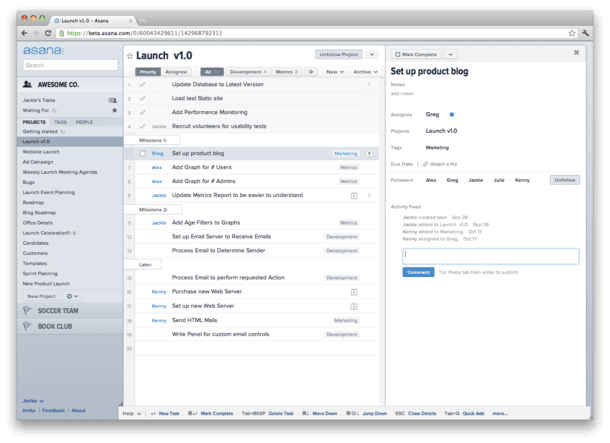
The interface is very simple and intuitive . After starting the program, Asana interface displays with 3 main panels:
Source: http://project-management.com/wp-content/uploads/2012/06/asana-screenshot.png

4.2.1 The left panel
Which gives you an overview of the workspace along with the general information of your project (Tab “Project”). You can access only one workspace that Asana chose for each time running the application. This is the place where you do operations related to project management such as:
- Adding new members to the project plan.
- Creating a new project with various project templates.
- Creating a project members group.
- Managing tagging with other members such as: assign tasks, messaging, and inbox.
The project names are displayed at this panel bottom that helps to find the project you are working on easily. Just one click, a separate project room is created for team members, which is unique and different from implementing projects in the traditional style.
4.2.2 The center panel
If the left panel provides general project information, the middle panel which occupies most of Asana's interface plays a key role in the specific project implementation steps.
In order to create a virtual office, Asana is full of practical tools such as Work, project, and task management, communication, views, reporting, team management, and top integrations as details:
- Organize your work into shared projects as lists or kanban boards for your initiatives, meetings, and programs.
- Tasks and subtasks are available for task assignments.
- Due dates and due times ensure team members not miss deadlines to get work done.
- Task dependencies shows which tasks are ready to start, and which tasks are waiting on others.
- Workload - a resource management feature provides a single view of the amount of work or of working time expected or assigned for team members. It helps project manager make decisions to rebalance workloads if needed.
- Milestones mark specific points in time along a project timeline in order to track major progress points that must be reached to achieve success.
- Project portfolios management - organizes strategic initiatives and monitor the status of all your important projects.
- Dashboard provides custom real-time charts to help you understand where work may be blocked or off-track, with the ability to export charts.
- File creation and sharing: Attach files directly to tasks with a built-in file chooser.
4.2.3 The right panel
Finally, the right panel is an attached note board and used for adding some project articles details specified in the middle panel.
Just click on "Write the Asana review" bar, you will easily see each member's name with specific assigned tasks, and add some comments. If you completed some stage, just tick the box of that job and you can notify all the members.
This is one of the special features that make Asana a highly interactive software. This feature helps you to track the project in a very convenient way, saving a lot of time, and accelerating the quality and productivity of work.
4.3 How to create a project in Asana:
- Click the
 (or Projects +) icon at the bottom of the left panel.
 - A new project will be created with a workspace in the center panel.
- Then you can optionally name the Project and add tasks to do.
- Besides, Asana supports creating a product roadmap project which is a strategic plan that defines a goal or desired outcome and includes the major steps or milestones needed to reach it. Users can add custom fields, use calendar view, and track product opportunities for multiple projects in product roadmapping.
4.4 Operations with Tasks
4.4.1 Create a new Task:
- Select a line in the center panel and press Enter.
- Type the project task name.
- Customize deadlines, task assignees, plans, tags, descriptions, or smaller tasks by clicking the icon to the right of the task line.
4.4.2 A typical task line of Asana
- Mark task as completed. To signal to other project team members that some task has been completed, you can click the icon to the left of each task or click the icon in the right panel.
- Summarize all completed tasks. You click on the upper right corner of the center panel and select "Archive Completed Tasks" to summarize the completed tasks. Thus, you will find the list of completed tasks during the project implementation easily.
4.5. How to work with Calendar
This feature makes tracking and managing workflows in the project team easier and faster.
 Source: https://asana.com/guide/help/views/calendar
The Gantt chart view, which called Timeline is Asana, is a visual and interactive representation of a project and the steps needed to complete it, including details about each step, such as who is responsible for completing it and any task dependencies.
A Gantt chart shows as a horizontal bar chart used to illustrate a timeline of a project, program, or work. Gantt charts give teams an overview of what work needs to get done, who’s doing it, and when. With this view, everyone can see at a glance how a project is progressing and what's up next.
Access a project's Calendar:
- Mark tasks complete.
- Create tasks in Calendar.
- Setting Colors on your project Calendar.
- Change due date using drag & drop.
- Subtask count.
Check out Which project software management to use: Jira vs. Asana vs. Monday.com? or try these workflows you can set up in just a few clicks with Approud.
To sum up, Asana is a simple and useful project management tool with a user-friendly interface. Asana helps users manage tasks, calendar view, file sharing, issue tracking and team management in a professional working environment.
Depend on every project management methodologies, Asana helps project managers plan, organize, and manage Agile projects and Scrum sprints in a task management tool that's as flexible and collaborative as your team.
Agile teams are suited to work quickly in changing conditions, helping organizations go to market faster with higher quality work. From Dashboards to Timelines and custom fields to dependencies, Asana has the features your team needs to build fast and ship often. Consider to manage your agile projects with a better agile management tool like Asana.